


Lighthouse marks its WebMCP audits as not applicable when the page it loads has no WebMCP API to look at. The API is only available through an origin trial right now, so for visitors, and for any Lighthouse run outside your own browser, your site has to be registered for the trial and send the token on every page. No token, no API, nothing to audit.
On WordPress the token goes in as a meta tag in the head or as an Origin-Trial response header, a few lines either way. Here is the whole route, with the WordPress side tested on 7.1, plus a way to write WebMCP code that survives the trial ending.
Key takeaways
- Lighthouse marks its WebMCP audits as not applicable when the page has no WebMCP API to inspect. The API is only available through an origin trial, so your site must send a valid token on every page, and Lighthouse needs Chrome 150 or newer. arvindkumar.ca
- Register your origin on Chrome’s origin trials site, and register again on Edge’s, because each browser issues its own tokens. Use the https address visitors land on, and tick the match all subdomains option if you want to cover the bare domain and subdomains. arvindkumar.ca
- Watch the Edge domain field and the expiry dates. The Edge form accepts http:// without complaint, but that token never works on an https site, and my Edge token expired about six weeks after I registered. arvindkumar.ca
- On WordPress, add the token with either a meta tag in the head or an Origin-Trial response header, not both. The meta tag must sit in the head, and the header can also be set outside WordPress in Apache, Nginx or a CDN. arvindkumar.ca
- Purge your page cache after every change, then check with curl, the Origin Trials section in Chrome DevTools (Application panel) and typeof document.modelContext in the console. After that, run Lighthouse with Agentic Browsing ticked. arvindkumar.ca
- Write your WebMCP code so the page works fine without the API. Check for document.modelContext, register tools only when it exists, and keep the AbortController so you can remove a tool. Ignore any guide that uses provideContext(), which is out of date. arvindkumar.ca
- Three clocks run at once: each token’s expiry, Chrome’s trial and Edge’s trial, which end no later than March 29, 2027. Put the renewal dates in your calendar, since a feature-detected script simply does nothing once a trial ends. arvindkumar.ca
Summarised from this post, formatted for answer engines.
Why does Lighthouse say not applicable?
The answer is in Lighthouse’s source code on GitHub. Its WebMCP gatherer enables the WebMCP domain of the DevTools Protocol, then runs one check in the page: is document.modelContext defined, or the older navigator.modelContext? If either step fails, all three WebMCP audits return not applicable.
So there are two causes. Either Lighthouse is running in a Chrome older than 150, which Chrome’s documentation says the category needs, or the page does not expose the API. Chrome only exposes it when the page carries a valid origin trial token, or when you have switched on chrome://flags/#enable-webmcp-testing for local testing. That flag changes only your own browser; a Lighthouse run anywhere else sees your site the way visitors do.
The Agentic Browsing category is experimental, and in the DevTools Lighthouse panel it is a checkbox that is off by default. It also checks for an llms.txt file, which I covered in adding llms.txt to WordPress.
What is an origin trial, and how do you register?
An origin trial gives a registered origin access to an experimental feature for a limited time, so the browser team can collect feedback before deciding the feature’s future. Chrome has already extended this one: when I registered this site in October 2026, the registration page listed WebMCP as available from Chrome 149 to Chrome 162, ending no later than March 29, 2027. Check the page for the current dates before you plan around them.
Registering in Chrome
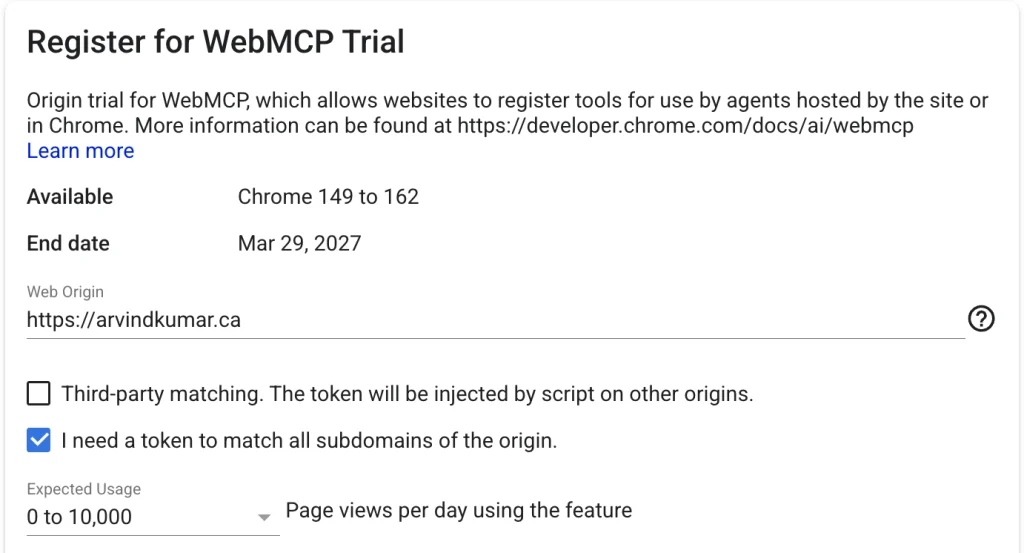
- Register in Chrome. Open Chrome’s origin trials site at developer.chrome.com/origintrials, find WebMCP and click Register.
- Enter the right origin. A token matches scheme, host and port exactly, so https://www.example.com and https://example.com are different origins. Register the https address visitors land on (the Site Address under Settings, General); the API only exists in secure contexts. To cover the bare domain and all subdomains, www and staging included, register https://example.com and tick the option to match all subdomains. Leave third-party matching off; it is for scripts that inject the token into other people’s sites. For expected usage, the lowest band, 0 to 10,000 page views a day, covers most sites.
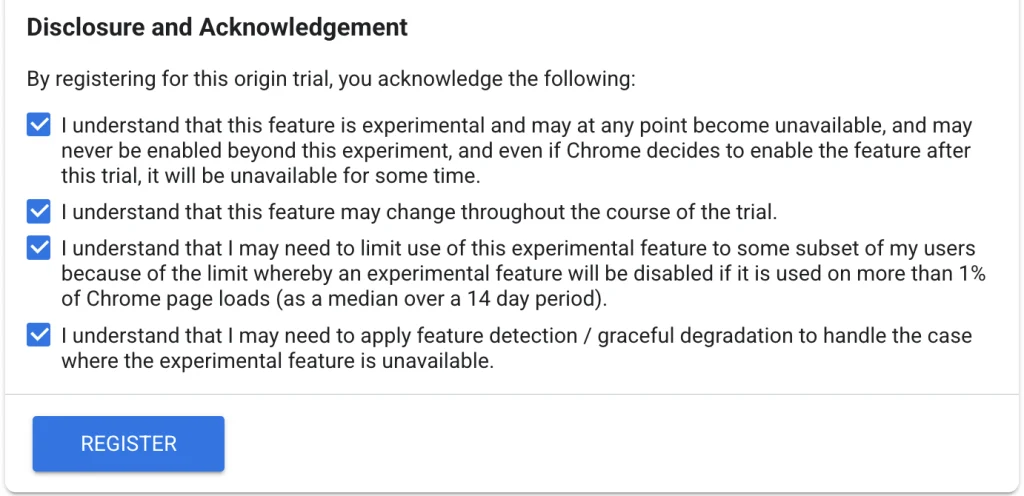
- Tick the four acknowledgements and click Register. Two of them shape your code: the trial can be switched off for everyone if the feature ends up on more than 1% of all Chrome page loads, and you are expected to handle the feature being unavailable. The script later in this post does that with feature detection.
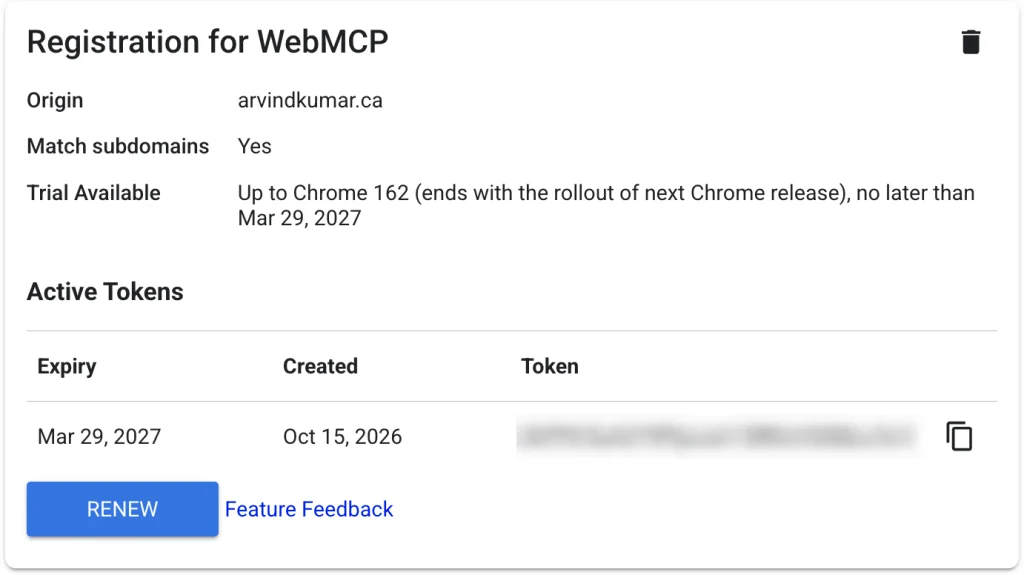
- Copy the token, a long base64 string, from the page that opens next. It lists each token with its expiry date; mine runs to the trial’s end date, March 29, 2027. Put that date in your calendar. Chrome says it will email a renewal reminder, and the Renew button on the same page gets you a new token if the trial runs longer.
Registering in Edge
Microsoft Edge runs its own WebMCP trial with its own tokens, so register there as well. The flow is similar, with one trap in the domain field.
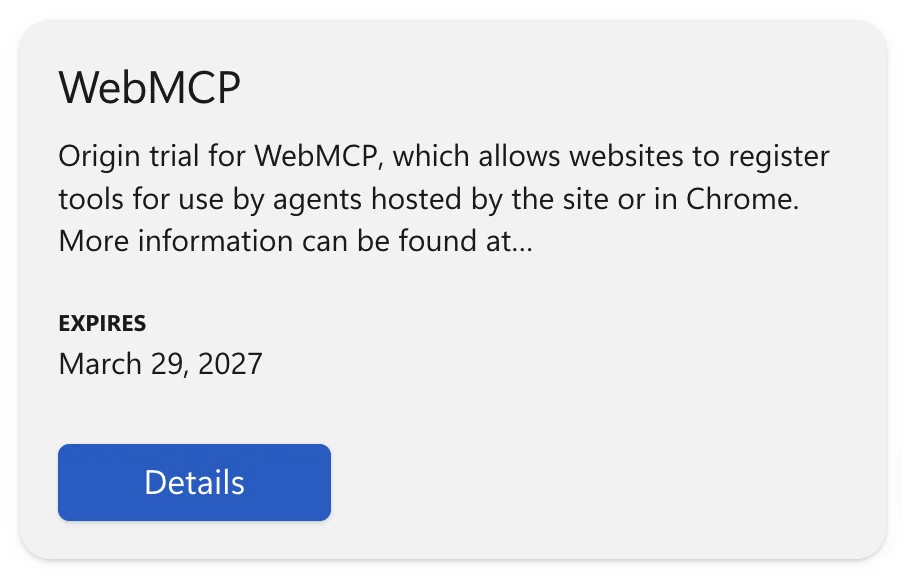
- Find the trial. On the Edge origin trials site at developer.microsoft.com/microsoft-edge/origin-trials, sign in with GitHub, click See trials under Select your origin trial, search for WebMCP and click Details.
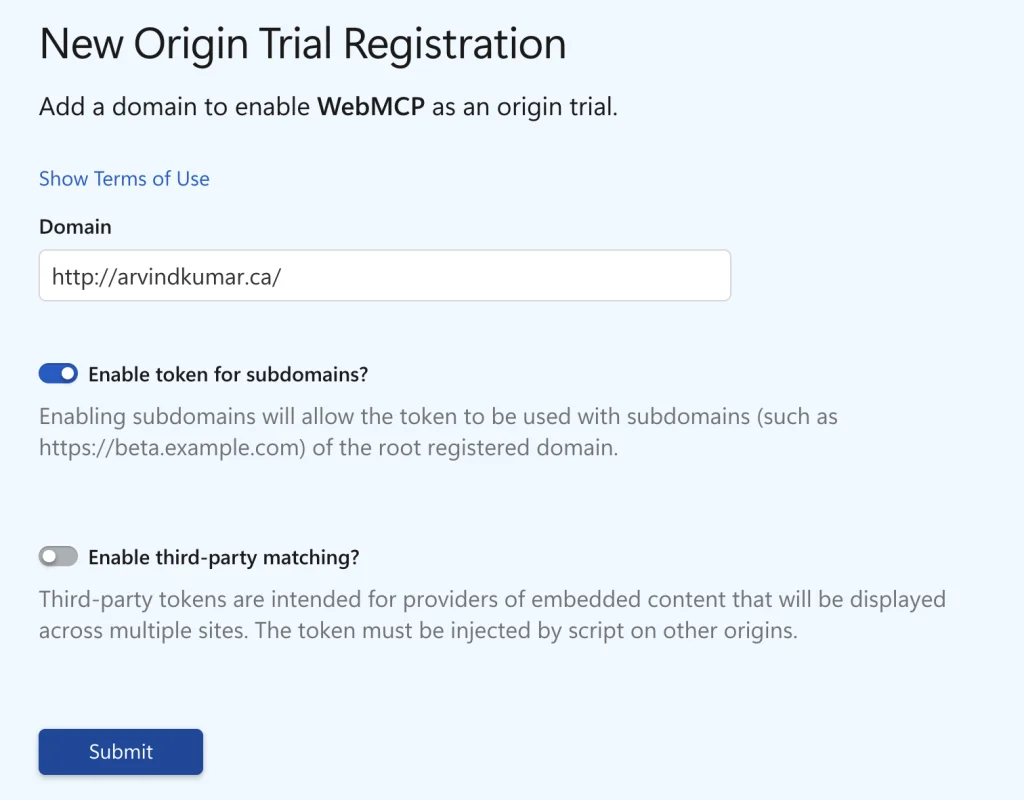
- Accept the terms. Scroll down to New Origin Trial Registration and tick I Accept the Terms of Use. Among other things, you agree that Microsoft can contact you for feedback.
- Enter the domain with https in front. The form takes http:// without complaint. My first Edge token came out for http://arvindkumar.ca on port 80, which never matches an https site, and WebMCP needs https anyway. Type https://example.com, turn on Enable token for subdomains, leave third-party matching off and click Submit.
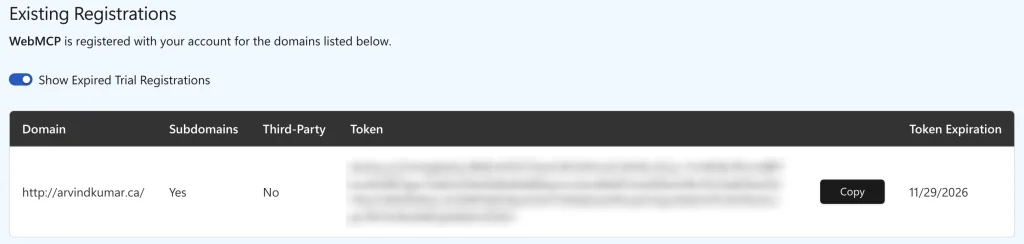
- Copy the token from the Registrations table that appears. Check its Token Expiration column: my Edge token expires about six weeks after I registered, long before the trial ends, so renew it from the same page in time.
How do you add the token in WordPress?
Put the plugin below in wp-content/plugins/mysite-origin-trial/ and activate it, or drop both of its files into wp-content/mu-plugins/, where they load without activation; both were tested on WordPress 7.1. Tokens first, then the two methods. Use one of them.
<?php
/**
 * Plugin Name: Origin Trial Tokens
 * Description: Sends WebMCP origin trial tokens for Chrome and Edge, as a meta tag or a response header.
 * Version:     1.0.0
 * Requires PHP: 7.4
 */

defined( 'ABSPATH' ) || exit;

/**
 * The tokens to send. Paste them here, or keep them out of version
 * control with a constant in wp-config.php:
 * define( 'MYSITE_OT_TOKENS', 'CHROME_TOKEN, EDGE_TOKEN' );
 *
 * @return string[]
 */
function mysite_origin_trial_tokens() {
	$tokens = array(
		'PASTE_YOUR_CHROME_TOKEN_HERE',
		'PASTE_YOUR_EDGE_TOKEN_HERE',
	);

	if ( defined( 'MYSITE_OT_TOKENS' ) ) {
		$tokens = explode( ',', MYSITE_OT_TOKENS );
	}

	// Tokens are base64 strings. Keep only those characters, so nothing
	// else can end up in a header or an attribute.
	$tokens = preg_replace( '/[^A-Za-z0-9+\/=]/', '', array_map( 'trim', $tokens ) );

	return array_filter( $tokens );
}
Tokens are public in your HTML anyway; the constant just lets staging and production carry their own without editing the plugin file. It goes in wp-config.php, above the line that says stop editing:
define( 'MYSITE_OT_TOKENS', 'CHROME_TOKEN, EDGE_TOKEN' );Method A: a meta tag in the head
/**
 * Method A: a meta tag, printed first in wp_head.
 */
add_action( 'wp_head', 'mysite_origin_trial_meta', 0 );
function mysite_origin_trial_meta() {
	foreach ( mysite_origin_trial_tokens() as $token ) {
		echo '<meta http-equiv="origin-trial" content="' . esc_attr( $token ) . '">' . "\n";
	}
}
Chromium only honours an origin-trial meta tag inside head and ignores one in the body, so placement matters. Hooking wp_head at priority 0 puts the tag ahead of everything else WordPress adds to the head, including any script that might touch the API. Because the tag is part of the HTML, a page cache serves it with the cached page.
Method B: an Origin-Trial response header
/**
 * Method B: an Origin-Trial response header. Chromium reads several
 * tokens from one header when they are separated by commas.
 */
add_action( 'send_headers', 'mysite_origin_trial_header' );
function mysite_origin_trial_header() {
	$tokens = mysite_origin_trial_tokens();

	if ( $tokens && ! headers_sent() ) {
		header( 'Origin-Trial: ' . implode( ', ', $tokens ) );
	}
}
The send_headers action fires on front-end requests after the main query and before the template loads, so the header goes out ahead of any output. Or set it outside WordPress, with Apache’s mod_headers (Header set), Nginx’s add_header or a CDN response header rule, and leave it out of PHP.
Caching bites both methods. A full-page cache serves the old HTML, with or without the meta tag, until you purge it, and a cache that serves pages as static files may drop a header that PHP added. Purge after every change, then check with curl.
How do you check that it worked?
- Check the response.
curl -sI https://www.example.com/ | grep -i origin-trialshows the header;curl -s https://www.example.com/ | grep -i origin-trialshows the meta tag. Run both against the live origin after purging the cache. - Check the token status. In Chrome DevTools open the Application panel, expand Frames and select top. The Origin Trials section lists WebMCP with a status per token: Success is what you want, WrongOrigin means the token was made for another origin (an http token on an https page lands here), Expired means renew it. Chrome ignores tokens it cannot validate, so the Edge token does no harm here.
- Check the API. In the console,
typeof document.modelContextprints “object” when the API is on, andawait document.modelContext.getTools()lists the tools your page registered. - Run Lighthouse again. Tick Agentic Browsing and run. With the API exposed, the registered tools audit lists your tools, the forms audit lists forms without toolname and tooldescription attributes (it stays not applicable on a page with no forms), and the schema audit passes or fails.
How do you write WebMCP code that survives the trial?
Write it so the page is fine without the API: check for document.modelContext, register only when it exists, and keep the AbortController so you can take the tool away again. This is the file the plugin loads, one read-only tool that searches the site through the REST API.
/* Register one read-only WebMCP tool, only where the API exists. */
( () => {
	// The API lives on document.modelContext. Early trial builds exposed it as
	// navigator.modelContext; that half of the line is only there for them.
	const modelContext = document.modelContext || navigator.modelContext;

	if ( ! modelContext || typeof modelContext.registerTool !== 'function' ) {
		return; // No token, the trial has ended, or another browser. The page works as before.
	}

	const restLink = document.querySelector( 'link[rel="https://api.w.org/"]' );
	const restRoot = restLink ? restLink.href : location.origin + '/wp-json/';
	const controller = new AbortController();

	modelContext.registerTool(
		{
			name: 'search_posts',
			description: 'Search the posts and pages on this site. Returns up to five titles with their URLs.',
			inputSchema: {
				type: 'object',
				properties: {
					query: { type: 'string', description: 'Words to search for' },
				},
				required: [ 'query' ],
			},
			annotations: { readOnlyHint: true },
			async execute( { query }, { signal } ) {
				const url = new URL( 'wp/v2/search', restRoot );
				url.searchParams.set( 'search', query );
				url.searchParams.set( 'per_page', '5' );

				// The agent's signal cancels the request if the agent stops.
				const response = await fetch( url, { signal } );
				if ( ! response.ok ) {
					throw new Error( 'Search failed with status ' + response.status );
				}

				const results = await response.json();
				return results.map( ( r ) => r.title + ': ' + r.url ).join( '\n' ) || 'No results.';
			},
		},
		{ signal: controller.signal }
	).catch( ( error ) => console.warn( 'WebMCP tool not registered:', error ) );

	// To take the tool away later, abort the signal: controller.abort();
} )();
Three things to notice. The first line keeps a fallback for navigator.modelContext, where early trial builds put the API; the spec and Chrome’s documentation now use document.modelContext, and Chromium has since removed the old name, so drop that half of the line once old builds stop mattering. Second, registration passes an AbortSignal, and aborting it unregisters the tool; that is the spec’s way to remove one. Third, execute() receives its own signal, which cancels the fetch if the agent stops. Keep the catch: registerTool() rejects duplicate names, empty descriptions and schemas that will not serialise.
If a guide you are reading calls navigator.modelContext.provideContext(), it is out of date. The current spec’s methods on document.modelContext are registerTool(), getTools() and executeTool(); there is no provideContext(). The plugin loads the file with the defer strategy:
/**
 * The WebMCP tool script, loaded on every front-end page.
 */
add_action( 'wp_enqueue_scripts', 'mysite_webmcp_script' );
function mysite_webmcp_script() {
	wp_enqueue_script(
		'mysite-webmcp',
		plugins_url( 'webmcp-tools.js', __FILE__ ),
		array(),
		'1.0.0',
		array( 'strategy' => 'defer' )
	);
}
When does it end?
Three clocks run at once: each token’s own expiry date, which for me was the trial’s end date in Chrome and about six weeks out in Edge; Chrome’s trial, which runs up to Chrome 162 and ends when the next release rolls out, no later than March 29, 2027; and Edge’s, which lists the same end date. Put the renewal dates in your calendar, and recheck both registration pages from time to time, since trials get extended or ended early. When a trial ends, the browser ignores the token, document.modelContext disappears unless WebMCP has shipped by then, and the feature-detected script above does nothing.
Register the origin, add the token one way, purge the cache and run Lighthouse again. The audits move from not applicable to a real result, and you get to watch how agents treat your site before the browser makers decide what WebMCP becomes.